
In the complex ecosystem of software development, we often pigeonhole ourselves into niches, believing in a clear divide between coding and server management and troubleshooting.
This perspective can leave a developer at a disadvantage when server-related issues arise.
We developers are reluctant to have some basic knowledge of servers. We often ignore that it’s the responsibility of the server and network guy.
I believe that a fundamental understanding of server operations is more than just an asset. It’s a necessity that can dramatically enhance our efficiency, problem-solving capabilities, and ability to collaborate with network professionals.
If we have some knowledge about servers, it will help us identify and delegate the server issues to the network administrator without wasting lots of time. Even sometimes we can effectively solve them by ourselves.
Table of Contents
Leveraging Server Knowledge for Effective Troubleshooting
Most recently, I was stuck with a perplexing error message:
MooChat is not working on your site, your chat server URL might be incorrect or your chat server is down.
I was following their documentation to make it active and check many coding errors, and it wasn’t the error log.
Then I focused on the server-related thing is it because of the blocked port and tried to fix it.
Here’s a breakdown of the steps I took and the tools that paved the way:
Initial Diagnosis: Using the curl command, I attempted to connect to the server on port 3890 in which I wanted to connect chat server, which resulted in a connection timeout error. This was the first clue that the issue lay deeper within the server or network configuration.
Network Scanning: With nmap, I conducted a scan of the server to check the status of various ports. The scan revealed that port 3890 was filtered, hinting at a firewall intervention.
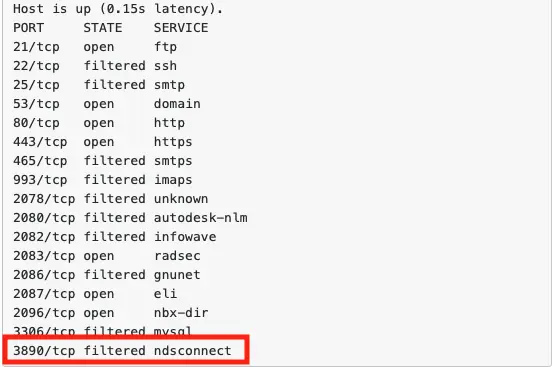
Checking Open Ports: Using netstat, I verified that my application was indeed listening on port 3890. This confirmed that the application was running as expected, and the issue was likely not internal to the server.
Firewall Investigation: I delved into the server’s firewall settings using iptables and firewalld, ensuring that rules were in place to allow traffic on port 3890. Despite correct settings, the connection issue persisted, leading me to suspect external firewall restrictions by the hosting provider.
Hosting Provider Interaction: Communication with the hosting provider’s support team was crucial. After explaining the situation and the steps taken, they conducted their investigations, ultimately identifying and resolving a block on port 3890 at their end.
Importance of Server Knowledge
This experience made me realize how important it is for developers to have a wide range of skills. Understanding server infrastructure, networking, and security is not just beneficial; it’s imperative.
Without that, I couldn’t make sure the issue was not on the coding end. It’s a server-side issue. So, basic server troubleshooting knowledge enables you a developer in the:
Anticipate and Mitigate Issues: Knowledge of server and network configurations allows developers to foresee potential roadblocks and implement solutions proactively.
Secure Applications: Knowing how to keep applications secure and being aware of common weaknesses helps developers keep their applications safe from threats.
Enhance Problem-Solving Skills: Familiarity with the underlying systems enriches a developer’s toolkit, making them more adept at troubleshooting and resolving complex issues.
Throughout this journey, I gained invaluable insights into the intricacies of firewalls, port configurations, and server settings.
I learned that every error message is an opportunity to expand one’s knowledge and that collaboration with infrastructure experts can lead to swift resolutions.
Closing Thoughts
Developers should not view server knowledge as peripheral. It’s a core skill that bridges gaps, enhances server troubleshooting acumen, and fosters a collaborative environment with network administrators.
My experience with a server problem that seemed impossible to solve not only expedited the resolution process. It also deepened my appreciation for the symbiotic relationship between code and server management.
I hope that sharing my story will help and inspire you as a developer to troubleshoot the server confidently.
Understanding the basics of server infrastructure is not about becoming a network expert. It’s about empowering yourself to tackle a wider array of problems with confidence and competence.
🚀 Before You Go:
- 👏 Found this guide helpful? Give it a like!
- 💬 Got thoughts? Share your insights!
- 📤 Know someone who needs this? Share the post!
- 🌟 Your support keeps us going!
💻 Level up with the latest tech trends, tutorials, and tips - Straight to your inbox – no fluff, just value!