
Accessibility is the cornerstone of modern software design and development, aiming to ensure equal access for all users, regardless of their abilities or disabilities. This crucial testing methodology facilitates the identification and removal of barriers that might hinder software interaction.
Table of Contents
Understanding the Context of Accessibility
When we speak of accessibility, we aren’t simply referring to an ethical choice or a legal requirement. It’s about recognizing and accommodating our society’s diverse user base. Every software must be designed inclusively, guaranteeing equal access and opportunities for everyone, including people with disabilities.
Accessibility testing involves validating an application’s technical aspects and usability. Not only that, it ensures that the software is usable by people with disabilities, such as vision impairment, hearing loss, and motor difficulties. It follows the guidelines set by the Web Content Accessibility Guidelines (WCAG) and Section 508 compliance to ensure optimal accessibility.
Role of Accessibility Personas
Designing for a broad spectrum of disabilities ensures our products reach as many users as possible. Additionally, regular testing with these diverse personas helps in crafting a digital world that is genuinely inclusive.
Illustrative Personas: Spectrum of Disabilities
- Emily, Visually Impaired: Emily uses a screen reader to interact with software. Without proper alt text for images or proper labeling of fields and buttons, she might struggle to understand the content and navigate the software.
- David, Motor Impairment: David has Parkinson’s disease, which results in tremors that make it difficult for him to use a mouse accurately. If clickable elements are too close together or if there isn’t a keyboard-only navigation option, he might find the software frustrating or even impossible to use.
- Sarah, Hearing Impaired: Sarah depends on captions and transcripts for audio and video content. If these are not provided or if they are not accurate, she could miss out on important information.
- Mike, Cognitive Impairment: Mike has dyslexia, which affects how he reads and comprehends text. Without the option to change the font type and size or use clear and simple language, he could find it challenging to use the software.
- Ana, Autism Spectrum Disorder: Ana has autism and is highly sensitive to certain colors and movements. Software with minimal, calming design aesthetics, avoiding sudden motion changes and blinking or flashing content, can help her stay focused and comfortable while using it.
- Joe, Cerebral Palsy: Joe’s cerebral palsy affects his muscle control, making precise movements challenging. Interfaces with small targets or complex drag-and-drop actions could be very challenging for him. Software that is designed to be used with simple mouse movements and provides keyboard shortcuts can significantly enhance the user experience.
- Lily, Blind: Lily is blind and relies entirely on a screen reader and keyboard navigation to use the software. Without well-structured content, correct tab order, and meaningful alt text, she would find it impossible to use the software effectively.
Embracing a Wide Range of Disabilities
By considering a wide range of disabilities when designing software, not only can we ensure that our products are accessible to as many people as possible, but we also need to regularly test the software with these personas in mind. By doing so, we can create a digital world that is truly inclusive and usable for all.
Assistive Technologies and Tools for Accessibility
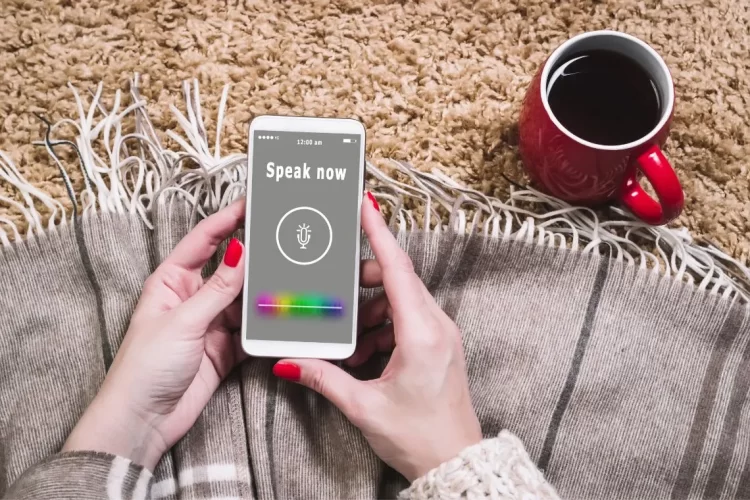
An extensive selection of assistive technologies is available for people with various types of disabilities.
- Screen readers: This software can read the text on the screen out loud. It’s incredibly helpful for visually impaired or blind users. Examples include JAWS, NVDA, and VoiceOver.
- Speech recognition software: This software converts spoken language into written text. This aids individuals who have physical disabilities that make typing difficult. Dragon NaturallySpeaking is a widely used example.
- Screen magnification software: This tool allows users to enlarge text and graphics on the screen for better visibility. Windows Magnifier and ZoomText are common examples.
- Braille technology: There are devices that translate digital text into Braille characters. This helps blind users read the content with their fingertips.
- Keyboard overlays: These are used to help users with motor disabilities to use keyboards more comfortably.
Adhering to Standards for a More Inclusive Web
Standards and guidelines exist for designing and developing software, including the highly recognized Web Content Accessibility Guidelines (WCAG) by the World Wide Web Consortium (W3C). By employing these assistive technologies and adhering to these guidelines, we can foster a more inclusive digital world. These guidelines cover a range of recommendations for making web content more accessible, including:
- Providing text alternatives for non-text content
- Offering alternatives for time-based media
- Ensuring content can be presented in different ways without losing information or structure
- Making it easy to see and hear content, including separating foreground from background
By using these assistive technologies and adhering to the recommended guidelines, we can make the digital world more inclusive, providing equal access and opportunities for everyone.
Accessibility Testing Tools
Plenty of testing tools can assess whether a website or software adheres to accessibility standards. Yet, they can’t replace the invaluable insights gained from real-world user testing, especially from users who rely on assistive technologies.
- Wave: is a suite of evaluation tools that help authors make their web content more accessible.
- W3C Validator: The Markup Validation Service by W3C allows users to check HTML and XHTML documents for well-formed markup.
- The Paciello Group Tools: This includes a variety of resources and tools for accessibility testing.
Remember, while tools can help identify issues, they can’t replace the human element. Getting actual users to test your product is crucial, especially users who rely on assistive technologies. This will provide you with valuable insights into how accessible your software is in real-world scenarios.

Accessible Design: Principles and Practices
Accessible design ensures that products, services, and environments are usable by as many people as possible without requiring adaptation or specialized design. It takes into account the full range of human diversity, including physical, perceptual, and cognitive abilities. In the digital world, accessible design means creating websites, apps, and other digital tools that are usable by people with disabilities.
Understanding the Web Content Accessibility Guidelines (WCAG)
The WCAG guidelines offer a set of shared standards for web content accessibility. They encompass four main principles: perceivable information, operable user interface, understandable information and user interface, and robust content and reliable interpretation. These guidelines contribute to making websites accessible to a broader range of people with disabilities, from blindness and low vision to deafness and hearing loss, learning disabilities, and cognitive limitations, to name a few.
Four Pillars of WCAG
WCAG guidelines are organized around four principles:
- Perceivable Information: Developers must present the information and user interface components in ways that all users can perceive. This might mean providing alternative text descriptions for images for blind users or providing transcripts or captions for video content for deaf or hard-of-hearing users.
- Operable User Interface: The interface and navigation must be operable. This includes making all functionality available from a keyboard for those who can’t use a mouse or ensuring that users have enough time to read and use the content.
- Understandable Information and User Interface: Users must be able to understand the information and the operation of the user interface. This includes making text readable and understandable or ensuring that web pages appear and operate in predictable ways.
- Robust Content and Reliable Interpretation: The content must be robust enough to be reliably interpreted by a wide variety of user agents, including assistive technologies. This includes ensuring compatibility with current and future user tools.
WCAG Compliance Levels
Each of these principles has specific guidelines associated with it and for each guideline, there are testable success criteria. These criteria are rated at three levels: A, AA, and AAA, indicating the level of conformance (with AAA being the highest).
WCAG guidelines are widely respected and often used as a standard for making websites accessible. Implementing these guidelines makes websites accessible to a wider range of people with disabilities, including blindness and low vision, deafness and hearing loss, learning disabilities, cognitive limitations, limited movement, speech disabilities, photosensitivity, and combinations of these.
Implementing WCAG in Design
To put these principles into practice, you could:
- Use semantic HTML: This helps screen readers understand your content and allows them to accurately communicate the information to users.
- Create a logical content structure: A well-structured content hierarchy helps all users understand and navigate your site.
- Ensure sufficient color contrast: Make sure text and background colors contrast well for users with poor vision or color blindness.
- Make all functionality keyboard accessible: Not all users can use a mouse. Make sure your website can be fully navigated using only a keyboard.
- Avoid time limits: Give users enough time to read and understand the content without pressure.
- Use clear language: Keep your content as simple and straightforward as possible. Avoid jargon or complex language.
Everyone benefits from accessible design. Not only does it improve usability for those with disabilities, but it also creates a better user experience for everyone else. Incorporating accessibility from the start of the design process is crucial. It ensures that a diverse population can use and enjoy your product, service, or environment.
Conclusion
In conclusion, accessible design is not just a buzzword or a checkbox, it’s vital in creating inclusive digital spaces that are usable for all. By adhering to the four core principles of accessible design – perceptibility, operability, understandability, and robustness – we can make sure that all users, regardless of their abilities or circumstances, can fully engage with our digital products and services.
Let’s remind ourselves that an inclusive web is our shared responsibility. Our duty as creators, designers, developers, and content producers is to design and create with accessibility in mind. By making our web content accessible, we can break down barriers, promote inclusivity, and pave the way for everyone to participate fully in the digital world. After all, accessibility isn’t just good design — it’s good business, and it’s the right thing to do.
To thrive in this tech-driven world, it’s not just about becoming proficient in accessibility testing. It also entails getting hands-on experience with different AI tools, which eventually help to become successful in AI jobs and, crucially, overcoming apprehensions associated with this rapidly evolving technology.
🚀 Before You Go:
- 👏 Found this guide helpful? Give it a like!
- 💬 Got thoughts? Share your insights!
- 📤 Know someone who needs this? Share the post!
- 🌟 Your support keeps us going!
💻 Level up with the latest tech trends, tutorials, and tips - Straight to your inbox – no fluff, just value!