Contact pages are some of the highest-intent pages on any website. If a visitor reaches the contact form, they’re no longer browsing. They’re ready to act.
And yet, contact pages are also surprisingly fragile.
They sit at the intersection of:
- frontend JavaScript,
- backend processing,
- email delivery,
- security layers,
- and third-party infrastructure.
When something breaks, it often doesn’t make a loud sound.
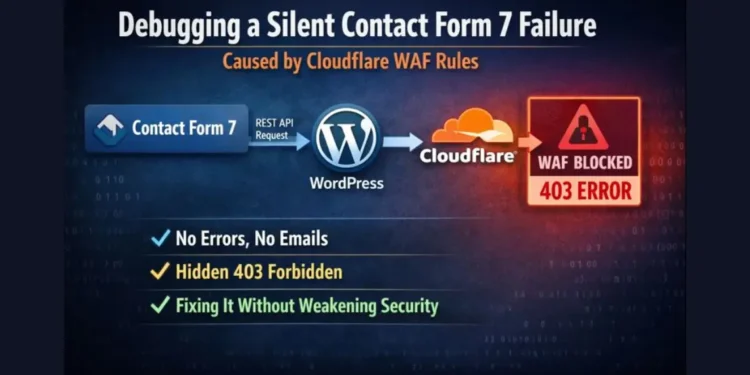
In this case, Contact Form 7 submissions started failing silently.
- No visible error message.
- No red validation text.
- No “mail failed” notice.
From the visitor’s perspective, the form simply… didn’t work.
From the site owner’s perspective, everything looked fine until leads stopped arriving.
The most misleading clue came next:
“It works when I disable security.”
That statement feels reassuring at first, but it’s actually one of the most dangerous signals you can encounter. It suggests the problem isn’t obvious, isn’t isolated, and isn’t guaranteed to fail every time.
And that leads to the core issue:
Lost leads don’t announce themselves.
They just disappear.
Table of Contents
What Was Actually Failing
On the surface, the form appeared healthy.
- Clicking Submit worked.
- No Contact Form 7 validation errors appeared.
- Required fields behaved correctly.
- The page didn’t reload or crash.
But beneath that calm surface, things were breaking.
Opening the browser’s developer tools revealed the real story:
- The console showed 403 (Forbidden) errors.
- The failed request wasn’t the page itself. It was a background request.
- Specifically, requests to:
/wp-json/contact-form-7/v1/contact-forms/…/feedbackThis is the endpoint Contact Form 7 uses to submit data via the WordPress REST API.
Even more confusing:
- The behavior was intermittent.
- Sometimes the form worked.
- Sometimes it failed.
- Changing or disabling certain security rules made it “magically” work again.
That inconsistency is what makes these bugs so hard to trust, and so easy to misdiagnose.
First Assumptions (And Why They Were Wrong)
When forms fail, most developers (even experienced ones) reach for the usual suspects.
Let’s go through them.
Email configuration issue? ❌
Tempting, but wrong.
The form never even reached the mail stage. The failure happened before the email delivery logic ran.
Contact Form 7 bug? ❌
Unlikely.
CF7 is stable, widely used, and heavily tested. If it were a core bug, the symptoms would be widespread and consistent.
REST API disabled in WordPress? ❌
Checked and confirmed working.
Other REST endpoints functioned normally. The issue was selective.
Hosting issue? ❌
No server errors.
- No PHP fatal errors.
- No resource exhaustion.
Everything pointed away from hosting.
The real problem with this stage is psychological.
Experienced developers get misled here because:
- the form UI looks fine,
- the error isn’t visible to users,
- and the failure happens outside WordPress core logic.
At this point, guessing becomes dangerous.
The only reliable path forward is to understand how the form actually works.
Understanding How Contact Form 7 Really Works
Contact Form 7 is not a simple “submit and reload” form.
Modern CF7 relies on:
- WordPress REST API
- JavaScript
fetch()requests
When a user submits a form:
- JavaScript intercepts the submission.
- A background request is sent to a REST endpoint.
- The server responds with JSON.
- CF7 updates the UI based on that response.
This architecture is fast and user-friendly, but it comes with a critical limitation.
REST requests cannot solve browser challenges
Security layers like Cloudflare often apply:
- JavaScript challenges
- Managed challenges
- Bot detection logic
These challenges assume a browser navigation flow.
REST API requests:
- don’t render pages,
- don’t execute challenge scripts,
- don’t retry intelligently.
If a REST request is challenged or blocked, it simply fails.
Why do security layers treat REST traffic differently
To a WAF, a REST POST request can look like:
- automated traffic,
- bot behavior,
- or suspicious activity.
Especially when:
- it’s a POST request,
- it happens in the background,
- and it doesn’t resemble a normal page load.
That mismatch, human intent vs machine-looking traffic, is where this entire issue lives.
Once you understand that, the investigation stops being about Contact Form 7…
…and starts to focus on request flow and rule evaluation.
The Investigation: Following the Request, Not the Plugin
At this point, it was clear the issue wasn’t inside Contact Form 7 itself.
The only way forward was to stop thinking in terms of plugins and start thinking in terms of requests.
Using Browser DevTools
The browser’s developer tools became the primary debugging tool.
During form submission:
- The Network tab was opened
- Logging was preserved across requests
- The form was submitted multiple times under different conditions
What mattered wasn’t the page reload. It was what happened after clicking Submit.
Among several background requests:
- A POST request to a Contact Form 7 REST endpoint
- Returning a 403 Forbidden response
- No retry, no fallback, no UI error
This explains why the error only appears after clicking submit.
The form UI itself loads correctly, but the failure happens during the asynchronous background request.
Once that request fails, the entire submission flow collapses silently.
Using Cloudflare Security Events
With the failing request identified, the next step was to trace it outside the browser.
Cloudflare’s Security → Events log revealed the missing piece.
By filtering events by:
- Response code (403)
- Request path
- Timestamp matching the submission
…it became clear that Cloudflare was blocking the request before it ever reached WordPress.
Even more revealing:
- The rule that blocked it did not mention Contact Form 7, REST, or forms at all.
- The rule name looked unrelated.
That was the moment the investigation shifted.
The Real Culprit: A “Feed Scraper” Rule That Wasn’t
The blocking rule was designed to stop feed scrapers.
Specifically, it blocked requests where:
- the URI path contained
/feed - and the client wasn’t a known bot
On paper, this looked harmless, even sensible.
After all:
- RSS feeds are common scraping targets
- Blocking them doesn’t usually affect site functionality
But in practice, the rule was too broad.
Why it seemed harmless
- It didn’t target forms
- It didn’t target REST
- It didn’t target POST requests explicitly
And yet, during form submission, background requests triggered it.
Once any required request was blocked, not just the submit endpoint, Contact Form 7’s JavaScript logic broke.
This is the critical insight:
Forms fail when any dependency fails, not just the submit endpoint.
Modern forms are chains of asynchronous requests.
Break one link, and the entire chain collapses.
Why the Obvious Fixes Are the Wrong Fixes
At this stage, it’s tempting to apply quick fixes.
They work, but they introduce bigger risks.
Why allowing /wp-json/ globally is risky
- It exposes the entire REST API
- It widens the attack surface unnecessarily
- It bypasses protections for endpoints that don’t need exemption
Why disabling Cloudflare or the WAF is not acceptable
- Security isn’t optional
- Forms are often attack vectors
- Disabling protection to “make it work” trades reliability for vulnerability
Why REST endpoints need selective exemptions
REST traffic isn’t the problem.
Unscoped rules are.
The fix isn’t to remove protection, it’s to make protection context-aware.
The Correct Fix: Security Without Breaking Conversions
The solution involved two focused changes, not a global rollback.
Step 1: Create a Skip Rule for Contact Form 7
A dedicated Cloudflare rule was added to skip security checks only for CF7’s REST endpoint:
/wp-json/contact-form-7/This rule:
- Skips Managed WAF rules
- Skips Bot Fight Mode
- Applies only to the exact CF7 path
Crucially, it was placed first in the rule order.
Rule order matters because Cloudflare evaluates rules top-down.
If a request is blocked early, later rules never get a chance to apply.
Step 2: Refine the Feed Scraper Rule
Instead of removing the feed scraper protection, it was refined.
The updated rule:
- Still blocks feed scrapers
- Explicitly excludes:
- REST API paths
admin-ajax.php
This makes the rule WordPress-aware, not weaker.
Bots are still blocked.
Legitimate background requests are allowed.
Cloudflare Free Plan Constraints (And How to Work Within Them)
On the Free plan, rule limits are real.
That constraint forces a useful discipline:
- Fewer rules
- Better logic
- Clear intent
Instead of stacking protections, this setup:
- Consolidates overlapping rules
- Uses exclusions instead of exceptions
- Preserves security without consuming extra rule slots
Smarter rules outperform more rules.
Turning a Fix Into a System: Storing Leads Internally
Fixing the form raised another concern:
Email-only lead handling is fragile.
Emails can fail.
- Notifications can be missed.
- Spam filters can intervene.
To reduce dependency on delivery, a lightweight internal system was added:
- Leads are stored in the WordPress database
- Viewable directly in the admin panel
- Exportable as CSV
- Preserving attribution data
The benefits are immediate:
- No reliance on email delivery
- Full visibility of submissions
- Ownership of lead data
- Better auditing and debugging
Lessons Learned (This Applies Beyond CF7)
Several broader lessons emerged from this experience:
- Security tools don’t understand WordPress context by default
- REST APIs are not browsers
- Over-blocking silently kills conversions
- “Looks unrelated” rules are often the most dangerous
- Debugging infrastructure issues requires tracing requests, not assumptions
When This Problem Is Likely to Affect You
This issue commonly appears when:
- WordPress runs behind Cloudflare
- A Free or low-tier WAF plan is used
- Custom rules block paths or POST requests
- Sites rely on CF7, WP REST, or AJAX-based workflows
If any of those apply, silent failures are a real risk.
Final Thoughts
Contact forms deserve special care.
They represent:
- trust,
- intent,
- and opportunity.
Security should protect that intent, not obstruct it.
Balancing protection with usability requires understanding how systems interact, not just what they block.
Because in the end:
A secure site that loses leads is not actually secure.
🚀 Before You Go:
- 👏 Found this guide helpful? Give it a like!
- 💬 Got thoughts? Share your insights!
- 📤 Know someone who needs this? Share the post!
- 🌟 Your support keeps us going!
💻 Level up with the latest tech trends, tutorials, and tips - Straight to your inbox – no fluff, just value!