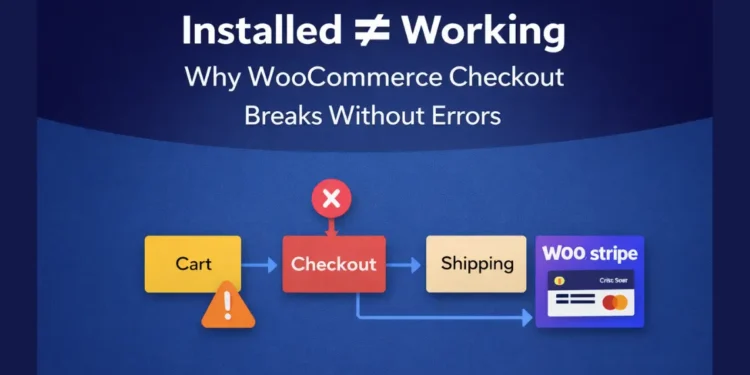
WooCommerce checkout issues are rarely loud.
There’s no fatal error.
No red warning.
No “plugin failed” message.
Instead, everything looks installed and active:
- Stripe is connected
- Shipping plugin is configured
- Products add to cart
- Checkout page exists
And yet, when a customer clicks Proceed to Checkout, something feels off.
Instead of a clear failure, the issues surfaced subtly. The checkout page redirected to unexpected locations, shipping behavior was inconsistent across flows, and although payment options appeared on screen, the overall order process didn’t feel reliable or predictable.
This post documents a real WooCommerce debugging case where nothing was technically “missing”, yet checkout was fundamentally broken.
Table of Contents
Everything is installed, but checkout is wrong
On the surface, the store looked fine:
- WooCommerce is installed and active
- Stripe / Woo Payments connected
- UPS shipping plugin configured with API credentials
- Products and cart are working
But the client reported:
- Checkout going to the wrong page
- Cart and checkout behaving inconsistently
- Payment and shipping feeling unreliable
This is one of the most misleading states in WooCommerce: when plugins are present, but the core flow is broken.
The first instinct (and why it’s usually wrong)
The most common reaction in this situation is:
- Reinstall Stripe
- Reconfigure shipping
- Disable random plugins
- Blame caching or hosting
That approach wastes time.
Before touching plugins, the checkout flow itself must be verified.
Step 1: Check WooCommerce system pages (the real foundation)
WooCommerce relies on system pages, not visual pages.
Specifically:
- Cart →
[woocommerce_cart] - Checkout →
[woocommerce_checkout] - My Account →
[woocommerce_my_account]
WooCommerce does not care about:
- Page titles
- Elementor layouts
- Page design
It only cares about:
Which page is assigned in WooCommerce → Settings → Advanced, and which shortcode exists inside that page?
What was actually wrong
In this case, multiple problems were stacked quietly:
1. Cart and Checkout were mapped incorrectly
- The Checkout page was pointing to a page that was effectively a Cart page
- One of the WooCommerce pages was actually a regular content page (e.g., “About”)
Result:
- Redirect loops
- Checkout bouncing back to cart
- Payment scripts are initializing inconsistently
2. Checkout page existed, but wasn’t a real checkout
There was a page labeled as “Checkout”.
But labels don’t matter.
When inspected, the page:
- Was built with a page builder
- Did not reliably contain
[woocommerce_checkout] - Looked correct visually, but failed functionally
This is a classic WooCommerce trap:
A page that looks like checkout, but is not checkout.
3. My Account page was missing
This one is subtle but important.
Without a properly assigned My Account page:
- Payment redirects can misbehave
- Logged-in states become inconsistent
- Order completion flows feel unstable
Stripe didn’t fail; the environment around it was incomplete.
Why payment and shipping appeared broken
Here’s the key insight:
Stripe and shipping plugins depend on the checkout flow.
If checkout is structurally broken, plugins only fail indirectly.
In this case:
- Stripe loaded (Google Pay, cards visible)
- UPS plugin was installed and configured
- But the checkout logic was confused
So the symptoms showed up around payment and shipping, even though they weren’t the root cause.
The fix (clean, minimal, and safe)
Instead of deleting anything, the fix followed three rules:
- Don’t break existing content
- Don’t redesign checkout
- Fix the structure first
What was done:
Created new, clean WooCommerce system pages:
- Cart
- Checkout
- My Account
Each page contained only the correct shortcode.
Assigned them properly in WooCommerce settings.
Reset permalinks.
Cleared cache.
No plugins were reinstalled. No APIs were re-entered.
The result
Immediately after fixing page assignments:
/cart/showed the real cart/checkout/showed a stable checkout form- Shipping section behaved consistently
- Stripe and express payment methods loaded reliably
- Orders could proceed normally
The system wasn’t broken. It was confused.
The lesson: Installed ≠ working
This case highlights a pattern I see repeatedly:
- Plugins are installed
- APIs are connected
- Settings look correct
- But WooCommerce’s core routing is wrong
When that happens:
- Checkout bugs feel random
- Payment gateways get blamed
- Shipping plugins look unreliable
In reality, the fix is often structural, not technical.
A simple mental checklist for WooCommerce checkout issues
Before touching plugins, always check:
- Are Cart, Checkout, and My Account separate pages?
- Do they contain the correct WooCommerce shortcodes?
- Are they properly assigned in WooCommerce settings?
- Is checkout built minimally (not over-designed)?
- Does
/checkout/work in an incognito window?
If those fail, nothing on top will be stable.
Final thoughts
WooCommerce rarely breaks loudly.
It breaks quietly, through:
- Misassigned pages
- Duplicated demos
- Page builder overrides
- Partial setups that “almost” work
Understanding this distinction is what separates
plugin installers from
WooCommerce problem solvers.
If your checkout feels unpredictable, start with structure, not plugins.
🚀 Before You Go:
- 👏 Found this guide helpful? Give it a like!
- 💬 Got thoughts? Share your insights!
- 📤 Know someone who needs this? Share the post!
- 🌟 Your support keeps us going!
💻 Level up with the latest tech trends, tutorials, and tips - Straight to your inbox – no fluff, just value!