AI tools are no longer useful only for writing text or generating code snippets. They are starting to connect directly with real systems: files, databases, APIs, developer tools, and websites. That is where MCP, short for Model Context Protocol, becomes important.
For WordPress developers, agencies, and WooCommerce store owners, this is not a future hypothetical anymore. The foundational pieces have already shipped. WordPress 6.9 merged the Abilities API into core, the official MCP Adapter arrived in early 2026, and WooCommerce 10.9 made stores natively addressable by AI agents. The question has shifted from “will this happen” to “how do I use it without handing an AI uncontrolled access to a live site.”
This guide explains what MCP is, what is actually shipping in WordPress and WooCommerce right now, and how to build safe, read-only-first workflows on top of it.
Table of Contents
What Is MCP?
MCP is a standard way for AI applications to connect with external tools and data sources. Normally an AI assistant only knows what you type into the chat. If you ask it about your WooCommerce orders, your plugin list, or your product stock, it cannot know those things unless you copy and paste the data in yourself.
MCP changes that. An assistant can connect to approved tools and resources that expose specific actions: reading recent orders, listing products, checking plugin status, generating a report, or creating draft content. The key idea is not “AI can do everything.” It is narrower and more useful than that:
For WordPress this matters because WordPress is no longer just a blogging platform. It runs business sites, WooCommerce stores, membership portals, LMS platforms, booking systems, and custom web applications, each with its own sprawl of products, orders, settings, plugins, and custom code.
What Has Actually Shipped in WordPress
This is the part most introductory MCP articles get vague about, so here is the concrete, current state.
The Abilities API is in WordPress core. The server-side (PHP) registration, retrieval, and execution layer was merged into core in WordPress 6.9 (December 2025), and the client-side JavaScript package landed in WordPress 7.0 (May 2026). It gives WordPress a first-class, cross-context way to register a capability (“ability”) in a machine-readable, human-friendly form. You register an ability with wp_register_ability() on the wp_abilities_api_init hook, and each ability carries strict input and output schemas, a permission callback, and metadata. The actual business logic stays inside whatever plugin, theme, or core component registered it.
The MCP Adapter is the bridge. An ability is not an MCP tool by itself. The official WordPress MCP Adapter, announced on the WordPress Developer Blog in February 2026, converts registered abilities into MCP tools, resources, and prompts that an MCP client can discover and call. At the time of writing the adapter ships as a plugin and Composer package rather than as part of core, so a current setup means installing the adapter alongside whatever abilities you want to expose.
One safety detail worth internalizing: registered abilities are not exposed to MCP by default. Exposure is explicit opt-in, and when an ability does run, its permission callback inherits the connected WordPress user’s capabilities. An agent cannot do anything the underlying user could not already do. That single design decision is what makes the whole thing safe enough to consider on real sites.
What Has Shipped in WooCommerce
WooCommerce is the most interesting surface here, and it moved fast. WooCommerce 10.9 (June 2026) shipped a canonical abilities layer: seven schema-defined domain abilities for products and orders, exposed through the WordPress MCP Adapter, so any MCP client (Claude Code, Cursor, VS Code) can query and update products and orders against a live store. Alongside core, the abilities surface extends into 20+ official extensions spanning gift cards, subscriptions, payments, shipping, and more.
Two things are worth being precise about, because the hype around this release tends to overstate it.
First, it ships as a developer preview. The WooCommerce and WordPress teams describe both the abilities layer and the adapter as evolving and subject to change. This is a “build and test on staging” feature, not a “wire it into your production store this afternoon” feature.
Second, the first pass of extension abilities is read-only by design. An agent can read a subscription status or a payment-account configuration without being able to change it. Write access is a separate decision the merchant makes deliberately, which is a meaningful contrast with a typical REST credential where read and write often come as a single grant. The older WooCommerce-specific MCP endpoint at /wp-json/woocommerce/mcp still exists for now but is deprecated in favor of the shared adapter, so new work should target the adapter, not that endpoint. If you are already untangling 10.9, the same release also changed checkout draft-order behavior and email logging, which we covered separately.
How an MCP Workflow Fits Together
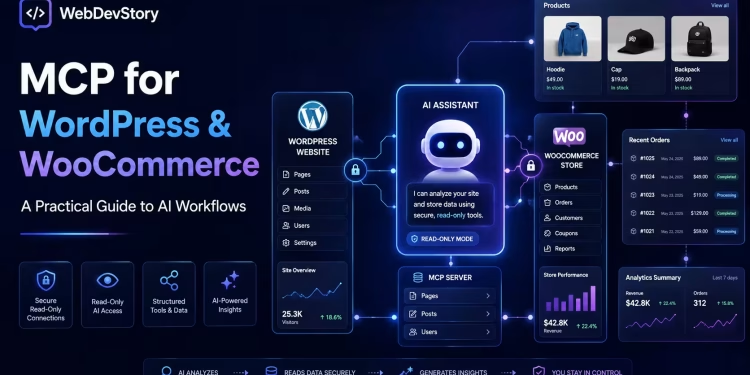
A simple MCP-powered WordPress workflow looks like this:
- You use an MCP-compatible client such as Claude Desktop, Claude Code, or Cursor.
- The client connects to an MCP server (provided by the MCP Adapter on your site).
- The adapter exposes the abilities you have explicitly opted in.
- Each ability runs its own permission check, then executes its registered logic against WordPress or WooCommerce.
- The assistant uses those approved tools to help with real tasks.
The flow, simplified: AI client to MCP Adapter to registered abilities to your site. This is fundamentally different from handing an AI tool your admin password and saying “do whatever you want.” A proper MCP workflow is scoped, permission-checked, and loggable, and it exposes only the actions you decided were safe.
Practical Use Cases
Here are realistic workflows where this is genuinely useful today, kept to the read-and-draft side of the line.
Content and SEO audits. With the right abilities exposed, you can ask an assistant to find posts without meta descriptions, list articles not updated in over a year, flag pages missing a featured image, or suggest internal links from recent content. This does not replace a full SEO tool, but it makes everyday content maintenance much faster, and for agencies it can feed straight into monthly reporting.
Site and plugin maintenance. An assistant can read installed plugins, outdated plugins, WordPress and PHP versions, the active theme, and recent errors, then draft a plain-language maintenance summary for a non-technical client. That last part matters more than it sounds, since many clients do not understand what “maintenance” actually involves, and a clear report makes the service easier to renew. This pairs naturally with a structured WordPress maintenance workflow.
WooCommerce store reporting. This is the standout. Instead of a store owner manually opening analytics, checking orders, and writing a Monday summary by hand, a read-only workflow can assemble it: total orders and revenue, best sellers, low-stock products, pending or failed orders, products missing images or descriptions, and a short list of recommended actions. The assistant changes nothing; it reads approved data and prepares the report. For deeper failure-mode context, we walked through why WooCommerce checkout breaks even when Stripe and shipping are installed, which is exactly the kind of diagnostic an agent can accelerate but not own.
Product content improvement. “Find products with weak descriptions and prepare improved drafts” is a strong fit for stores with large catalogs (electronics, fashion, spare parts, refurbished devices). The assistant reads selected product data, identifies short or missing descriptions, and prepares improved copy plus suggested SEO titles and meta descriptions as drafts. A human reviews everything before publishing.
A Safe Way to Start: Read-Only First
The biggest mistake with MCP is giving too much access too early. The encouraging part is that the WordPress design already pushes you toward safety (opt-in exposure, inherited permissions), but the workflow discipline is still on you.
Good first workflows are reads and drafts: summarize recent orders, list low-stock products, detect missing product images, find draft products, check pages without meta descriptions, generate a maintenance report, prepare customer reply drafts.
The best workflow is not “AI does everything.” It is “AI checks, summarizes, drafts, and recommends; humans approve the changes that matter.”
A Practical Setup Sequence
For a small store or agency, a sane order of operations looks like this.
Start on staging. Use a staging site or local environment first (WordPress Studio is built for exactly this). You can test MCP tools without risking real orders, payments, or customer data.
Expose specific abilities, not everything. Opt in named, narrow abilities rather than flipping on a broad surface. Concrete, single-purpose tools are far safer than open-ended access:
# Examples of narrow, read-only-first abilities to expose
woocommerce/get-recent-orders
woocommerce/get-low-stock-products
store/find-products-missing-images
content/find-posts-without-meta-description
reports/generate-weekly-store-summary
Require human approval for writes. The assistant can prepare draft descriptions, draft posts, suggested price changes, and customer reply drafts. Publishing, editing orders, changing prices, and issuing refunds stay human-controlled.
Log every action. For any client site you should be able to answer: what tool ran, when, who or what triggered it, what data came back, and whether anything changed. The MCP Adapter supports custom observability handlers for exactly this, and WooCommerce surfaces adapter activity under its own status logs. Logging is what turns this from a risk into something you can stand behind with a client.
A Worked Example: A Read-Only Low-Stock Ability
The fastest way to understand this is to build one small thing end to end. The example below registers a single read-only ability that returns low-stock WooCommerce products, then exposes it to an AI client through the MCP Adapter. It is deliberately narrow: one tool, no write access, a real permission check. That is the right shape for a first ability.
An ability is registered in two parts. First you register a category (once), on the wp_abilities_api_categories_init hook. Then you register the ability itself on wp_abilities_api_init, giving it input and output schemas, a permission callback, and an execute callback that holds the actual logic.
// 1. Register a category for store-reporting abilities.
add_action( 'wp_abilities_api_categories_init', 'wds_register_store_category' );

function wds_register_store_category() {
    wp_register_ability_category(
        'store-reports',
        array(
            'label'       => 'Store Reports',
            'description' => 'Read-only reporting abilities for the store.',
        )
    );
}

// 2. Register the low-stock ability in that category.
add_action( 'wp_abilities_api_init', 'wds_register_low_stock_ability' );

function wds_register_low_stock_ability() {
    wp_register_ability(
        'wds-store/get-low-stock-products',
        array(
            'label'            => 'Get Low-Stock Products',
            'description'      => 'Returns products at or below a stock threshold.',
            'category'         => 'store-reports',
            'input_schema'     => array(
                'type'       => 'object',
                'properties' => array(
                    'threshold' => array(
                        'type'        => 'integer',
                        'description' => 'Stock level at or below which to flag a product.',
                        'default'     => 5,
                    ),
                ),
            ),
            'output_schema'    => array(
                'type'  => 'array',
                'items' => array(
                    'type'       => 'object',
                    'properties' => array(
                        'id'    => array( 'type' => 'integer' ),
                        'name'  => array( 'type' => 'string' ),
                        'sku'   => array( 'type' => 'string' ),
                        'stock' => array( 'type' => 'integer' ),
                    ),
                ),
            ),
            'execute_callback' => 'wds_get_low_stock_products',
            // Only users who can manage WooCommerce may run this.
            'permission_callback' => function() {
                return current_user_can( 'manage_woocommerce' );
            },
            // Opt this ability in to MCP exposure explicitly.
            'meta' => array(
                'show_in_rest' => true,
                'mcp'          => array(
                    'public' => true,
                    'type'   => 'tool',
                ),
            ),
        )
    );
}

// 3. The actual logic. Read-only: it queries and returns, nothing else.
function wds_get_low_stock_products( $input ) {
    $threshold = isset( $input['threshold'] ) ? (int) $input['threshold'] : 5;

    $query = wc_get_products( array(
        'limit'        => 50,
        'stock_status' => 'instock',
        'return'       => 'objects',
    ) );

    $low = array();
    foreach ( $query as $product ) {
        $stock = $product->get_stock_quantity();
        if ( null !== $stock && $stock <= $threshold ) {
            $low[] = array(
                'id'    => $product->get_id(),
                'name'  => $product->get_name(),
                'sku'   => $product->get_sku(),
                'stock' => (int) $stock,
            );
        }
    }

    return $low;
}
Three things in that code are doing the safety work, and they are worth pointing out because they are the whole reason this is publishable on a real site. The permission_callback means the ability only runs for a user who can already manage WooCommerce, so an agent connected as a lower-privileged user simply cannot call it. The meta.mcp.public flag is the explicit opt-in; without it, the ability exists but stays invisible to MCP. And the execute callback only reads, it never writes, so the worst case is an information query, not a destructive action.
With the MCP Adapter active and the ability registered, you connect a client. For local development with Claude Code that is a single command pointing at your environment’s adapter endpoint:
# Register your site's MCP server with Claude Code
claude mcp add wds-store --transport http \
  https://staging.example.com/wp-json/mcp-adapter/wds-store
Now the loop closes. The store owner asks a plain question, the client discovers the exposed ability, runs it through its permission check, and returns structured data the assistant turns into a readable answer:
Owner: Which products are running low and need reordering?
Assistant (via the ability): Five products are at or below a stock level of 5: USB-C Cable (2 left), Wireless Mouse (3), Laptop Stand (1), HDMI Adapter (4), and Phone Case Black (5). The Laptop Stand and USB-C Cable are the most urgent.
That is the entire pattern. One narrow ability, an explicit opt-in, a permission check, read-only logic, and a client that turns “what’s low on stock” into a real query against the live store. To add the weekly-report workflow from earlier, you register a few more abilities the same way (recent orders, products missing images, pending orders) and let the assistant compose them. Nothing about the shape changes; you are just adding tools to the box.
Security Risks to Take Seriously
MCP is powerful precisely because it connects AI to real tools, which is also why it deserves care. The risks worth naming: exposing too much data, weak authentication, granting write access too early, prompt injection, connecting unvetted third-party MCP servers to a client site, unclear permissions, and no activity logging. For WordPress and WooCommerce these are not abstract, because sites routinely hold customer PII, payment-related order details, and admin information.
A safe setup follows least-privilege principles: staging first, read-only tools by default, no shared admin credentials, tight per-tool scope, full logging, approval gates before any write, and no unnecessary exposure of personal data. The same instinct applies to which servers you trust at all. The broader point about AI making the developer pipeline a security battleground applies directly here, and the discipline from common web application security vulnerabilities maps onto what an agent is allowed to touch.
The rule of thumb: if you would not give a random plugin full admin access, do not give an AI workflow full admin access either. Treat MCP as an integration layer, not a toy.
What This Means for Developers and Agencies
For developers, this opens a genuine new line of work. The future of WordPress development is not only themes and plugins; it is also designing AI-accessible workflows safely. The useful skills stack up predictably: the Abilities API, the WooCommerce REST API, custom ability and plugin development, permission and authentication design, WP-CLI, MCP Adapter configuration, and logging. Most businesses will not know how to connect AI tools to their sites safely, and they will need developers who build controlled workflows instead of risky shortcuts.
For agencies, this becomes a service layer: AI-assisted maintenance setup, WooCommerce reporting assistants, content-audit workflows, custom ability development, and safe Claude or Cursor setups for development teams. The operative word is “safe.” Clients do not need hype; they need workflows that save time without creating security problems. “We help WordPress and WooCommerce businesses adopt AI-assisted workflows safely” is a far stronger position than “we connect AI to your website.” This is the same shift from implementation to workflow ownership we argued in the move from full-stack developer to agentic engineer.
Should You Use MCP on a Live Site Today?
The honest answer: carefully, and starting small. The foundations are real and in core, but the WooCommerce abilities layer and the adapter are still a developer preview, so test in local or staging first. A production-safe starting point looks like read-only access, a small set of named tools, no exposure of customer-sensitive data beyond what a task needs, no automatic writes, logging enabled, approval required for anything that changes data, and a staging dry run before any of it touches the live store.
MCP is not a magic button. It is an integration standard, and the quality and safety of any workflow still come down to how the developer designs it.
Final Thoughts
MCP, the Abilities API, and the MCP Adapter together are one of the more consequential building blocks WordPress has added in years. For WordPress, they create a structured, permission-checked way for AI assistants to interact with real site capabilities. For WooCommerce, they make stores natively addressable by agents for products, orders, reporting, and content. For developers, they open a service opportunity around building safe AI workflows on real business systems.
The way to approach it is not to chase the hype. Start with practical, read-first workflows: read data, summarize it, draft changes, identify issues, recommend next actions, and require human approval for anything that matters. That is where MCP earns its place: not as a replacement for WordPress developers, but as a new layer that makes developers, agencies, and site owners meaningfully more productive.
FAQ
Is the WordPress Abilities API actually in core?
Yes. The server-side PHP layer merged into WordPress 6.9 (December 2025), and the client-side JavaScript package was added in WordPress 7.0 (May 2026).
Is the MCP Adapter part of WordPress core?
Not yet. As of mid-2026 the official WordPress MCP Adapter ships as a plugin and Composer package. There is ongoing discussion about moving it onto a canonical or feature-plugin path, so this may change.
Can I use MCP with my WooCommerce store right now?
You can experiment with it. WooCommerce 10.9 shipped canonical product and order abilities exposed through the MCP Adapter, but it is a developer preview. Test on staging before considering anything on a live store.
Does the Abilities API replace the WooCommerce REST API?
No, it complements it. The REST API remains standard for typical CRUD operations. The Abilities API targets discoverable, composable actions meant to be consumed by AI agents and automation.
Is it safe to connect an AI assistant to my site?
It can be, if you design it carefully. Abilities are not exposed to MCP by default, and each one inherits the connected user’s permissions. Start read-only, expose only specific tools, require approval for writes, and log everything.
What is the difference between an ability and an MCP tool?
An ability is a registered WordPress capability with schemas and a permission check. The MCP Adapter converts an exposed ability into an MCP tool that an AI client can discover and call. One produces the other.
🚀 Before You Go:
- 👏 Found this guide helpful? Give it a like!
- 💬 Got thoughts? Share your insights!
- 📤 Know someone who needs this? Share the post!
- 🌟 Your support keeps us going!
💻 Level up with the latest tech trends, tutorials, and tips - Straight to your inbox – no fluff, just value!