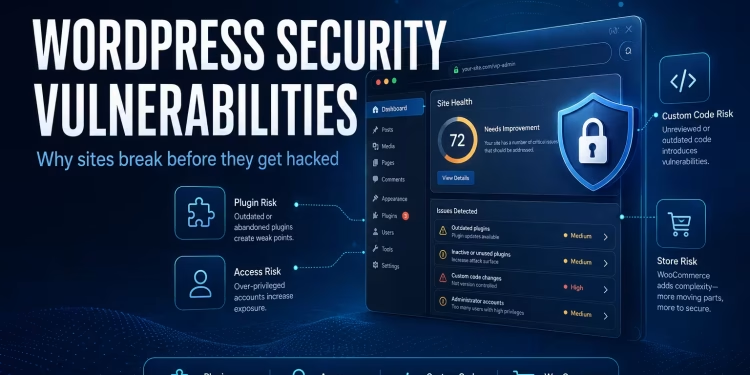
When a WordPress site goes down, the first reaction is usually panic.
“Was it hacked?”
“Did an update break everything?”
“Is WordPress insecure?”
Those questions are understandable because website failures often appear to happen without warning. One moment everything works normally, and the next moment visitors are greeted with a critical error message, a blank white screen, failed checkouts, or unexpected redirects.
However, while working through WordPress recovery projects, performance investigations, and security-related troubleshooting cases, we have noticed a recurring pattern: the visible failure is usually sudden, but the underlying problem is not.
Most security incidents build pressure quietly over weeks, months, or even years.
- An outdated plugin remains installed long after it has been abandoned by its developer.
- A custom code snippet is added quickly to solve a business requirement but never reviewed again.
- Administrator permissions are granted to multiple users because it is convenient at the time.
- WooCommerce extensions are layered repeatedly as new features are needed, without evaluating the overall architecture.
Individually, none of these decisions appear dangerous.
Collectively, they create an environment where instability becomes increasingly likely.
Eventually, something triggers the visible failure:
- A fatal PHP error after an update
- A database issue exposed by increased traffic
- A checkout process broken by conflicting plugins
- A malware injection exploiting an old vulnerability
- Resource exhaustion caused by excessive background processes
At that point, many site owners believe the incident happened overnight.
In reality, the conditions that enabled the failure were often present long before the website actually went down.
This distinction matters because it changes how we think about WordPress security.
Security is not merely about reacting to attacks. It is about identifying and reducing the structural weaknesses that allow small problems to become major incidents.
In this article, we examine several modern WordPress security vulnerabilities and recurring patterns seen while diagnosing broken, unstable, and compromised websites. Rather than focusing only on generic checklists, we will explore the practical issues that repeatedly appear in real-world environments. For a broader foundation, our guide to common web application security vulnerabilities explains many of the core concepts behind these risks.
Table of Contents
The Myth: “WordPress Itself Is Insecure”
WordPress has powered a significant portion of the web for years, yet it continues to face criticism whenever a site is compromised.
The conclusion many people reach is simple:
“WordPress is insecure.”
The reality is more nuanced.
When properly maintained, WordPress core is rarely the primary source of security incidents.
The modern security challenge typically comes from everything surrounding WordPress rather than WordPress itself.
These challenges usually originate from:
- The plugin ecosystem
- Custom code quality
- Hosting configuration
- Operational discipline
- Access management practices
WordPress is intentionally flexible. That flexibility allows businesses, developers, agencies, and store owners to build almost any type of website imaginable.
However, flexibility also introduces complexity.
Every plugin adds functionality. Every custom integration adds additional logic. Every third-party dependency introduces another potential point of failure.
As the number of moving parts increases, so does the overall attack surface.
Two WordPress websites may run exactly the same version of WordPress core while having dramatically different security profiles.
One site may use carefully maintained plugins, disciplined update procedures, restricted administrator access, and a well-structured hosting environment.
Another site may contain dozens of plugins accumulated over several years, outdated extensions, shared administrator credentials, and custom code copied from multiple online sources.
Both sites technically run WordPress.
Only one is likely to remain stable over the long term.
This is why security discussions focused entirely on WordPress core often miss the real issue.
Security failures rarely occur because WordPress exists.
They occur because complexity grows without corresponding discipline.
The more components added without structure, the larger the attack surface becomes. The larger the attack surface becomes, the more difficult it becomes to monitor, maintain, and secure the environment.
In many cases, what appears to be a security problem is actually an architecture problem. This is closely connected to security debt in software engineering, where small ignored risks accumulate until they become expensive operational problems.
Security is rarely about WordPress core. More often, it is about architectural discipline.
1. Abandoned or Poorly Maintained Plugins
One of the most common patterns observed in compromised or unstable WordPress environments is the presence of outdated or abandoned plugins.
These plugins often share similar characteristics:
- No longer actively maintained
- Compatible only with older PHP versions
- Built on outdated dependencies
- Containing publicly known but unpatched vulnerabilities
The dangerous aspect of abandoned plugins is that they often continue functioning.
The website appears stable. Pages load normally. Administrators see no obvious warnings.
As a result, the plugin remains active indefinitely.
Over time, however, compatibility gaps begin to emerge.
WordPress evolves. PHP versions advance. Other plugins introduce new dependencies. Security researchers discover vulnerabilities.
Meanwhile, the abandoned plugin remains unchanged.
This creates a growing disconnect between the plugin and the environment surrounding it.
In many real-world investigations, the compromise did not originate from WordPress itself.
Instead, it originated from a forgotten plugin installed years earlier for a small feature request, a temporary experiment, or a one-time business requirement.
The plugin was never removed because it appeared harmless.
Unfortunately, appearing harmless is not the same as being secure.
Outdated extensions may expose:
- Insecure AJAX endpoints
- Weak permission validation
- Unpatched file upload vulnerabilities
- Authentication bypass flaws
- Deprecated libraries with known exploits
Because these issues accumulate silently, plugin-related vulnerabilities frequently remain undetected until a major incident occurs.
The longer abandoned software remains active, the greater the risk becomes.
2. Weak Administrative Practices
Not all security failures are technical.
Many originate from operational decisions.
Weak administrative practices remain one of the most underestimated security risks in the WordPress ecosystem.
Common examples include:
- No two-factor authentication
- Shared administrator credentials
- Excessive administrator roles
- Stale user accounts
- No login monitoring
- Password reuse across platforms
Brute-force login attempts occur continuously across the internet.
Automated bots routinely target:
wp-login.phpxmlrpc.phpand XML-RPC endpoints/wp-json/and REST authentication routes
Many security plugins successfully block these attempts.
However, blocking attacks is only one part of the equation.
Reducing exposure is equally important.
Consider a website where multiple individuals have administrator privileges despite not requiring them.
Each additional administrator account creates another potential entry point.
If one password is compromised through credential reuse or phishing, the attacker gains access to the highest level of permissions available.
The problem becomes even more severe when administrator credentials are shared between multiple people.
In such cases:
- Accountability disappears
- Password hygiene weakens
- Access management becomes impossible
Many successful compromises are surprisingly simple.
No sophisticated exploit. No advanced malware.
Just weak credentials or poorly managed access controls.
Security begins with discipline.
Applying the principle of least privilege, limiting administrative access, auditing user accounts regularly, and enforcing strong authentication practices significantly reduce risk.
Without these fundamentals, even the most advanced security tools cannot fully compensate.
3. Insecure Custom Code & Snippets
While outdated plugins receive considerable attention, custom code often represents an even greater hidden risk.
Many WordPress websites contain custom code snippets added over time to support business requirements.
Examples include:
- Checkout modifications
- Pricing adjustments
- Form handling
- Third-party integrations
- Custom administrative features
These snippets are commonly added through:
functions.php- Code Snippets plugins
- Theme templates
- Custom plugins
Unlike widely used plugins, these modifications rarely undergo extensive testing or security review.
As a result, vulnerabilities frequently emerge from assumptions made during development.
Common issues include:
- Unsanitized user input
- Unescaped output
- Direct database queries without prepared statements
- Missing nonce verification
- Weak capability checks
- Insecure file upload handling
The challenge is that these vulnerabilities often remain invisible.
The website appears to function correctly. Forms submit successfully. Checkout processes complete normally. Everything seems stable.
However, security vulnerabilities are rarely triggered by normal behavior.
They emerge when unexpected input is introduced, malicious requests are submitted, or automated bots discover exposed functionality.
A custom feature may work perfectly for legitimate users while simultaneously exposing a critical security weakness.
This is why secure development practices matter.
- Input should be sanitized.
- Output should be escaped.
- Database interactions should use prepared statements.
- Administrative actions should verify permissions and nonces.
Without these protections, seemingly harmless snippets can become significant attack vectors.
Many site owners never see these vulnerabilities because they exist beneath the surface.
The code works until the day it encounters a situation its author never anticipated.
When that happens, the resulting failure often appears sudden.
In reality, the vulnerability existed from the moment the code was deployed.
4. REST API & XML-RPC Abuse
Not every attack attempts to break into WordPress through the visible login screen.
Modern automated bots often probe WordPress sites through endpoints that many site owners rarely think about, including the REST API and XML-RPC.
The REST API is useful and necessary for many WordPress features, themes, plugins, and integrations. XML-RPC, although older, may still be enabled on many websites for compatibility reasons.
The problem is not that these systems exist. The problem is that exposed endpoints can become targets for automated abuse when they are not properly managed.
Common patterns include:
- Repeated login attempts through
xmlrpc.php - Endpoint probing by automated bots
- Credential stuffing attempts
- Requests designed to discover usernames or exposed data
- High-frequency traffic that increases server load
Even when these attempts fail, they can still create operational problems.
A site may begin to feel slower. Server resources may spike. Login pages may become flooded with requests. WooCommerce checkout performance may degrade because the same server is handling both real customers and malicious traffic.
This is where security and performance begin to overlap.
Many site owners interpret the issue as “slow hosting” or “plugin bloat,” when part of the problem may be aggressive automated traffic hitting exposed endpoints repeatedly. Similar request-handling problems can also appear in forms and filtering systems, as we discussed in our article on Contact Form 7 failures caused by Cloudflare WAF rules.
The solution is not always to disable everything blindly. Some websites rely on REST API functionality. Some integrations may depend on XML-RPC or similar communication layers.
A better approach is to review what the site actually needs, restrict what is unnecessary, monitor suspicious traffic, and apply protections at the correct layer.
Security should reduce exposure without breaking legitimate functionality.
5. WooCommerce-Specific Attack Surfaces
WooCommerce changes the security profile of a WordPress website.
A standard brochure website mostly handles content.
A WooCommerce store handles products, customers, orders, payments, shipping rules, coupons, inventory, tax logic, and transactional emails.
That makes the website more valuable — and more complex.
Common WooCommerce-related risks include:
- Checkout validation issues
- Payment gateway conflicts
- Coupon abuse and discount logic problems
- Inventory manipulation through poorly configured extensions
- Order status handling issues
- Shipping or tax logic bypasses
Many WooCommerce issues are not traditional “hacks” in the obvious sense.
Sometimes the weakness is business logic.
For example, a checkout flow may allow unexpected combinations of shipping methods, coupon rules, or payment conditions. A plugin conflict may prevent order status from updating correctly. A poorly configured extension may expose customer-related functionality in unintended ways.
These issues can damage revenue even when the site is not fully compromised.
A broken checkout is a security and business continuity concern because it directly affects trust, transactions, and customer experience. We explored this type of problem more deeply in our article on why WooCommerce checkout breaks even when Stripe and shipping are installed.
This is why WooCommerce should not be treated as “just another plugin.”
It is part of the business infrastructure.
When WooCommerce stores grow without architectural planning, each new extension increases complexity. Payment plugins, shipping plugins, tax plugins, product feed plugins, subscription plugins, and marketing plugins all interact with the same checkout and order system.
If that ecosystem is not managed carefully, small conflicts can create serious operational failures.
For businesses planning a store from the beginning, our guide on what it actually takes to launch a WooCommerce store in Norway gives a practical view of setup, structure, and operational planning.
6. Why WordPress Sites Suddenly Go Down
When a site goes down, the visible symptom is often dramatic.
Visitors may see:
- A white screen of death
- A critical error message
- A database connection error
- Unexpected redirects
- Broken checkout behavior
- Missing layouts or distorted pages
But the visible symptom is rarely the full story.
Downtime is not always caused by one obvious failure. Sometimes it is the result of several issues overlapping at once, similar to the layered investigation we shared in our case study on troubleshooting mysterious website downtime involving VPS, DNS, and hosting expiry.
A WordPress site may go down because of a fatal PHP error, but the deeper reason could be an outdated plugin that was never compatible with the current PHP version.
A WooCommerce checkout may fail because of a payment plugin conflict, but the deeper reason could be years of extension stacking without compatibility review.
A site may display malware redirects, but the deeper reason could be an abandoned plugin or weak administrator access.
Common underlying causes include:
- Plugin or theme conflicts
- Memory exhaustion
- Corrupted database entries
- Malware injections
- Autoloaded options bloat
- Broken update processes
- Incompatible PHP versions
This is why emergency fixes should not stop at restoring the visible page.
Restoring the site is only the first step.
The more important work is identifying why the failure happened and whether the same structural weakness remains inside the system.
If the root cause is ignored, the same site may break again after the next update, traffic spike, or plugin conflict.
7. Security Plugins Alone Do Not Solve Structural Problems
Security plugins are useful.
They can help with firewall rules, malware scanning, login protection, file monitoring, and basic hardening.
But security plugins cannot replace architectural discipline.
This is an important distinction.
A security plugin may block suspicious requests, but it cannot automatically fix poor access management.
It may detect malware, but it cannot always explain why the malware entered the system.
It may warn about outdated plugins, but it cannot decide which dependencies should be removed, replaced, or rebuilt.
It may add protection layers, but it can also add complexity if configured incorrectly.
In some cases, site owners install multiple security plugins hoping to become “extra secure.”
That can create new problems:
- Overlapping firewall rules
- Performance overhead
- False positives
- Login conflicts
- Blocked legitimate requests
Security should not become another form of plugin stacking.
The better approach is to combine security tools with disciplined maintenance:
- Clean plugin inventory
- Controlled updates
- Least-privilege access
- Reliable backups
- Server-level monitoring
- Code review for custom functionality
Security plugins are part of the system.
They are not the whole system.
8. Practical Hardening Principles That Actually Work
WordPress security does not need to be complicated, but it does need to be disciplined.
Instead of chasing every new security trick, most websites benefit from consistent hardening principles applied properly.
Minimize Dependencies
Every plugin should have a clear purpose.
If a plugin is inactive, abandoned, duplicated, or used for a minor feature that can be handled more cleanly, it should be reviewed carefully.
Fewer dependencies mean fewer update risks, fewer compatibility conflicts, and a smaller attack surface.
Update in Controlled Stages
Blindly updating everything on a live production site is risky, especially for WooCommerce stores or complex membership sites.
Updates should be tested when possible, especially major plugin, theme, PHP, or WooCommerce updates.
A controlled update process reduces emergency failures.
Restrict Administrative Access
Not every user needs administrator permissions.
Use the lowest role required for each person’s task. Remove stale accounts. Enable two-factor authentication for critical accounts.
Strong access management prevents many simple compromises.
Monitor Logs, Not Just Dashboards
Dashboards show what plugins decide to show.
Server logs often reveal deeper patterns: repeated login attempts, endpoint probing, PHP warnings, memory issues, and suspicious request patterns.
Real security visibility requires looking beyond the WordPress admin area, which is why basic server troubleshooting knowledge is valuable for developers and site owners.
Protect Backups and Recovery Paths
A backup is only useful if it can be restored.
Many businesses assume backups exist, but never test recovery. During an incident, that assumption becomes dangerous.
Reliable recovery planning is part of security. Our guide to database recovery techniques explains why integrity, availability, and recovery planning matter when systems fail.
Treat WooCommerce as Infrastructure
WooCommerce is not only a shop plugin.
It handles revenue, orders, customers, payments, and business workflows.
Its security and stability should be treated with the same seriousness as any other business-critical system.
9. When to Rebuild Instead of Patch
Not every broken WordPress site should be patched forever.
Sometimes a site reaches a point where repeated fixes become more expensive than rebuilding the system properly.
This usually happens when:
- Fixing one issue creates another
- Updates repeatedly break the layout or functionality
- The plugin stack is too large and unclear
- Custom code is undocumented
- The theme is outdated or heavily modified
- Performance problems return after every optimization
- Security incidents repeat despite cleanup
In those situations, the website is not just experiencing isolated problems.
It is showing signs of architectural decay. This is where technical debt becomes more than a development concern — it becomes a stability, security, and business continuity issue.
Patching may restore short-term functionality, but it does not always restore long-term stability.
A clean rebuild can be the better decision when the existing foundation is too fragile.
This does not mean rebuilding should be the first recommendation.
Many WordPress issues can be solved through careful debugging, cleanup, and targeted improvements.
But when the system has accumulated years of unmanaged complexity, rebuilding can reduce future risk, improve performance, and create a more secure foundation.
The key is knowing the difference between a fixable issue and a failing architecture.
Final Thoughts
Modern WordPress security vulnerabilities are real.
But most security failures are not mysterious.
They often come from predictable patterns:
- Outdated plugins
- Weak administrator practices
- Insecure custom code
- Uncontrolled endpoint exposure
- Complex WooCommerce extension stacks
- Poor update discipline
- Lack of monitoring and recovery planning
The important lesson is this:
WordPress does not usually fail because it is WordPress.
It fails when structure is neglected.
A secure WordPress site is not created by panic after an incident. It is created through disciplined development, controlled maintenance, careful access management, and continuous architectural awareness.
For site owners who want prevention rather than emergency recovery, a structured WordPress maintenance approach can help reduce risk through updates, monitoring, backups, and controlled improvements.
Security is not just a plugin.
It is not just a firewall.
It is not just a checklist.
Security is a mindset built into how the website is developed, maintained, monitored, and improved over time.
When that mindset is present, WordPress can be stable, secure, and scalable.
When it is missing, even a small vulnerability can eventually become a major failure.
🚀 Before You Go:
- 👏 Found this guide helpful? Give it a like!
- 💬 Got thoughts? Share your insights!
- 📤 Know someone who needs this? Share the post!
- 🌟 Your support keeps us going!
💻 Level up with the latest tech trends, tutorials, and tips - Straight to your inbox – no fluff, just value!